Updates for Timesheet Reviewers
We've introduced a few quality-of-life improvements to the Timesheet Review experience, helping reviewers verify and approve entries faster with fewer clicks.
What's New?
- Logged Hours are now pre-filled as Approved Hours
When reviewing a timesheet, the Approved Hours field is now automatically populated with the Logged Hours.
If the logged time is correct, you can simply review and approve. If changes are needed, you can still edit the approved hours before submitting.
- Review Directly from the Table View
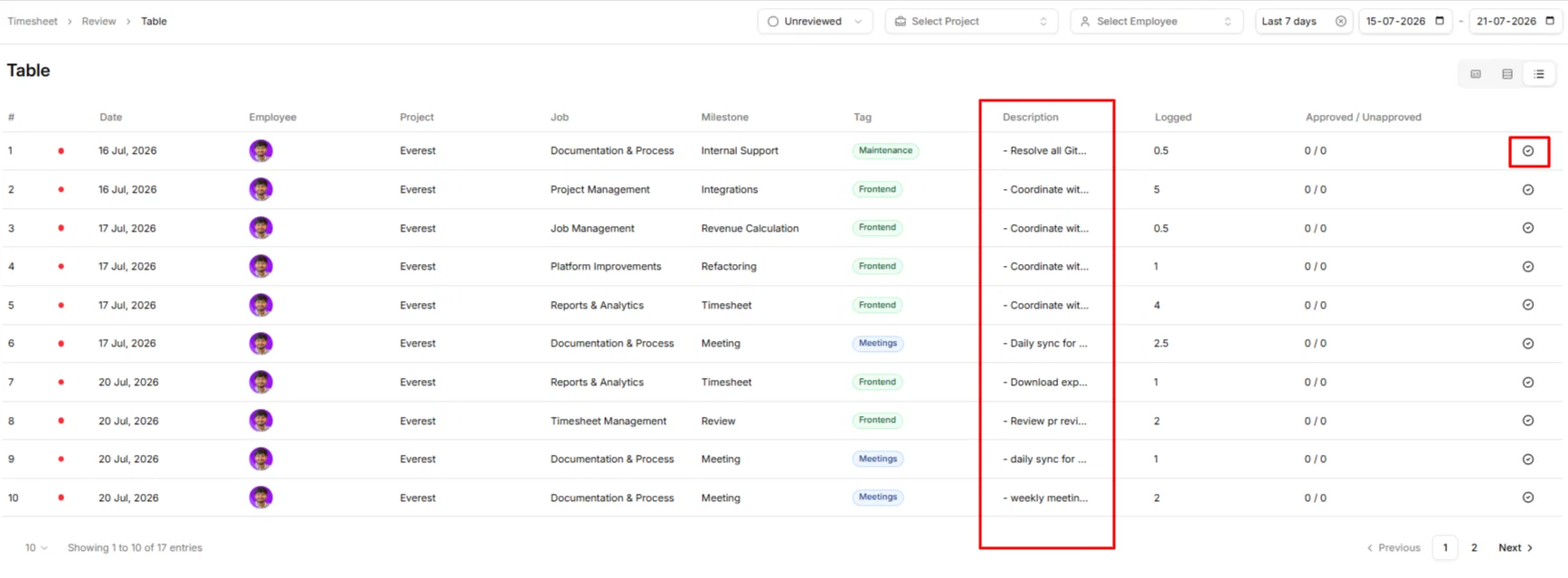
You can now start a review directly from the Timesheet Review table.
A new Review action has been added to the last column. Clicking it opens the same review dialog you're familiar with, allowing you to:
- Verify the timesheet details
- Adjust approved hours if required
- Submit your review without leaving the table
- Description Now Available in the Table
We've also added the Description column to the review table, making it easier to understand the work at a glance.
For longer descriptions, simply hover over the cell to view the complete text in a tooltip—no need to open the timesheet just to read the details.
Why This Matters
These enhancements help you:
- Review timesheets more efficiently
- Reduce repetitive data entry
- Verify work without unnecessary navigation
- Access important context directly from the table
- Complete approvals with fewer clicks
A faster review workflow means less time managing timesheets and more time focusing on your team's work.